Checkers
A downloadable game
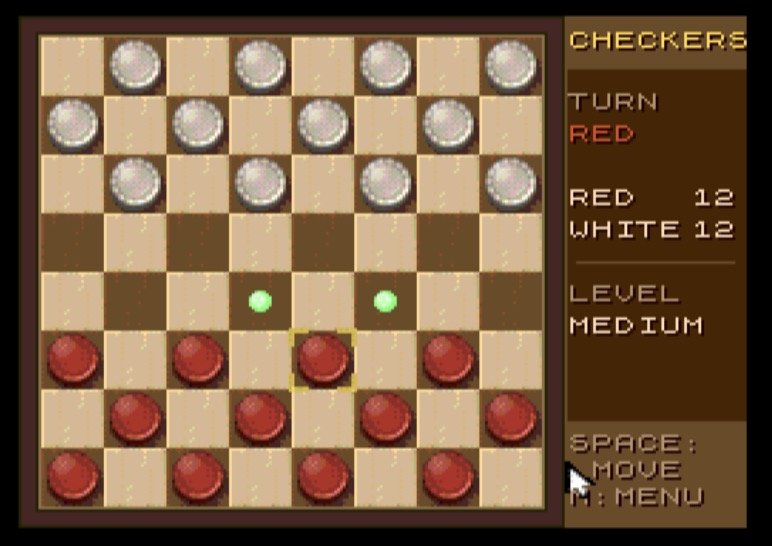
Checkers brings the English draughts to the ZX Spectrum Next.
Features
- Full English checkers rules on an 8×8 board: men move and capture forward, kings one square in every direction. Captures are mandatory, multi-jumps are played out completely, and a man reaching the back row is crowned (ending its move).
- Computer opponent with three levels: Easy, Medium, Hard.
- Play as Red or White.
- Take back moves – undo your own move together with the computer's reply.
- Keyboard, Kempston joystick and Kempston mouse supported.
Controls
| Input | Action |
|---|---|
| Cursor keys 5 6 7 8 or Q A O P | Move cursor |
| SPACE / ENTER | Select piece / confirm target |
| U | Take back move |
| M | Open menu |
| Kempston joystick | Move, fire to confirm |
| Kempston mouse | Point at a square, left button = select, right button = menu |
After selecting a piece, green dots mark all legal target squares and the cursor jumps
only between them. Multi-jumps are entered jump by jump. Press SPACE on the starting square again to deselect.
From the menu you can start a new game, choose your colour and set the difficulty.
Language: English.
How to run
- Real hardware: copy
checkers.nexto your SD card and start it from the Next browser. - Emulators: tested with CSpect, ZEsarUX and MAME (ZX Spectrum Next driver) – load the
.nexfile.
Requirements: ZX Spectrum Next (or compatible emulator).
Download
Click download now to get access to the following files:
Comments
Log in with itch.io to leave a comment.
Hi, thanks for the checkers game; I’m going to teach the kids how to play. I noticed some interesting behavior in the emulator when pressing the arrow keys.
Is this game also written in assembly language?
Yes. Which emulator you use, and what is the interesting behaviour?
MAME emulator. When pressing the arrow keys, the cursor (cell highlight) seems to try to move in the indicated direction but very often snaps back to the mouse cursor. At the same time, the mouse cursor also moves pixel-by-pixel in the indicated direction.
I guess that is because the mouse settings might be too sensible. Anyhow I uploaded a new version which changes the field only if the mouse cursor entered a new field or if the mouse button has been pressed. Probably this mitigates the issue.
That the mouse follows the cursor keys is mame specific. There is a setting that the mouse follows the cursor keys (INC/DEC). You can disable it: press TAB, "Input Settings", "Input Assignments (this system)". Scroll down to "Mouse X Analog Inc". There is the key (Right) defined which moves the mouse by one. Press delete to undefine the key. Do the same for X Dec and Y Inc/Dec. Close the settings with TAB.
You might experience that the TAB key is not working, then on Windows you need to press Scroll-Lock before (on Mac FN+Delete/Backspace).
Arrow key controls are working now too - awesome. But the computer still beats me :)
yes, it got 28MHz for computation :-)